SQLAlchemy & Odin Data Access
Fifty Data Science
Simeon Simeonov
Agenda
- SQLAlchemy - Design & overview
- SQLAlchemy - A small practical example
- Odin Data Access - Overview and examples
- Q & A
What is SQLAlchemy?
SQLAlchemy is a Python library created by Mike Bayer to provide a high-level Pythonic interface to RDBMS such as PostgreSQL, SQLite, MySQL, Oracle, DB2.
SQLAlchemy includes RDBMS-independent SQL expression language and an object-relational mapper (ORM).
Why use SQLAlchemy?
portability - the programming interface is independent of the type of RDBMS and connector used
security - no more SQL injections
abstraction - no need to bother with complex JOINs
object-orientation - you work with objects and NOT tables and rows
performance - exploits the likehood of reusing a particular query
flexibility - you can override almost anything
Basic architecture
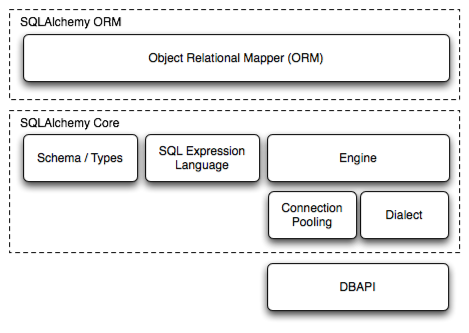
SQLAlchemy consists of several components, including the SQL expression language and the ORM.
In order to enable these components, SQLAlchemy also provides an Engine class and MetaData class.
- Engine- manages the SQLAlchemy connection pool and the database-independent SQL dialect layer
- MetaData - used to collect and organize information about your table layout (schema)
- Session - establishes all conversations with the RDBMS and represents a "holding zone" for all the objects which you've loaded or associated with it during its lifespan
- SQL expression language - provides an API to execute your queries and updates against your tables, all from Python, and all in a database-independent way (low-level interface)
- ORM - provides a convenient way to add database persistence to your Python objects withoutrequiring you to design your objects around the database, or the database around the objects (high-level interface)
Example
SQLAlchemy gives us the choice between classical mapping and the newer declarative mapping
              import sqlalchemy
              sqlalchemy.__version__

              from sqlalchemy import create_engine

              # engine = create_engine("postgresql+psycopg2://user:zipassword@localhost/mydb" , echo=True)
              # The string form of the URL is dialect+driver://user:password@host/dbname[?key=value..],
              # where dialect is a database name such as mysql, oracle, postgresql, etc.,
              # and driver the name of a DBAPI, such as psycopg2, pyodbc, cx_oracle
              # The echo flag is a shortcut to setting up SQLAlchemy logging,
              # which is accomplished via Python’s standard logging module.
              # With it enabled, we’ll see all the generated SQL produced.
              # engine = create_engine("sqlite:///library.db", echo=True)
              engine = create_engine("sqlite:///:memory:", echo=True)

              metadata = MetaData()

              from sqlalchemy import Table, Column, Integer, String, MetaData, ForeignKey

              authors_table = Table(
                  "authors",
                  metadata,
                  Column("id", Integer, primary_key=True),
                  Column("name", String),
              )  # Column("name", String(50)) is possible

              books_table = Table(
                  "books",
                  metadata,
                  Column("id", Integer, primary_key=True),
                  Column("title", String),
                  Column("description", String),
                  Column("author_id", ForeignKey('authors.id')),
              )

              metadata.create_all(engine)  # creates the tables
Example (cont...)
Use of SQL expression language
              insert_stmt = authors_table.insert(bind=engine)
              type(insert_stmt)
              # Out: <class 'sqlalchemy.sql.expression.Insert'>
              print(insert_stmt)
              # Out: INSERT INTO authors (id, name) VALUES (:id,:name)

              compiled_stmt = insert_stmt.compile()
              print(compiled_stmt.params)
              # Out: {'id': None, 'name': None}

              insert_stmt.execute(name="Alexandre Dumas")  # insert a single entry
              insert_stmt.execute([{"name": 'Mr X'},{'name': 'Mr Y'}])  # a list of entries

              metadata.bind = engine  # no need to explicitly bind the engine from now on
              select_stmt = authors_table.select(authors_table.c.id==2)
              result = select_stmt.execute()
              result.fetchall()
              # Out: [(1, u'Mr X')]

              del_stmt = authors_table.delete()
              del_stmt.execute(whereclause=text("name='Mr Y'"))
              del_stmt.execute()  # delete all
Example (cont...)
Use of classical mapping
              from sqlalchemy.orm import mapper
              from sqlalchemy.orm import relationship, backref

              class Author:
                  def __init__(self, name):
                      self.name = name

                  def __str__(self):
                      return self.name


              class Book:
                  def __init__(self, title, description, author):
                      self.title = title
                      self.description = description
                      self.author = author

                  def __str__(self):
                      return self.title

              mapper(Book, books_table)
              mapper(Author, authors_table, properties = {"books": relation(Book, backref="author")})
Example (cont...)
Doing the same thing the easy way with declarative mapping
              from sqlalchemy.ext.declarative import declarative_base
              from sqlalchemy.orm import relationship, backref

              Base = declarative_base()

              class Author(Base):
                  __tablename__ = "authors"

                  id = Column(Integer, primary_key=True)
                  name = Column(String)

                  def __init__(self, name):
                      self.name = name

                  def __str__(self):
                      return self.name


              class Book(Base):
                  __tablename__ = "books"  # self.__table__ will be available for our objects

                  id = Column(Integer, primary_key=True)
                  title = Column(String)
                  description = Column(String)
                  author_id = Column(Integer, ForeignKey("authors.id"))
                  author = relationship(Author, backref=backref("books", order_by=title))

                  def __init__(self, title, description, author):
                      self.title = title
                      self.description = description
                      self.author = author

                  def __str__(self):
                      return self.title

              Base.metadata.create_all(engine)# create tables
Example (cont...)
Creating instances
              from sqlalchemy.orm import sessionmaker

              Session = sessionmaker(bind=engine)  # bound session
              session = Session()

              author_1 = Author("Richard Dawkins")
              author_2 = Author("Matt Ridley")

              book_1 = Book("The Red Queen", "A popular science book", author_2)
              book_2 = Book("The Selfish Gene", "A popular science book", author_1)
              book_3 = Book("The Blind Watchmaker", "The theory of evolutio", author_1)  # typo

              session.add(author_1)
              session.add(author_2)
              session.add(book_1)
              session.add(book_2)
              session.add(book_3)  # or simply session.add_all([author_1, author_2, book_1, book_2, book_3])

              # session.flush()
              session.commit()  # flushes (issues the statements and sends them to the RDBMS) and commits

              book_3.description = "The theory of evolution"  # update the object
              book_3 in session   # check whether the object is in the session
              # Out: True

              session.commit()
Example (cont...)
Queries
              session.query(Book).order_by(Book.id)  # returns a Query instance with a .statement attribute
              session.query(Book).order_by(Book.id).all()  # returns an object-list

              # return all book objects where title == "The Selfish Gene"
              session.query(Book).filter(Book.title == "The Selfish Gene").order_by(Book.id).all()

              # using LIKE
              session.query(Book).filter(Book.title.like("The%")).order_by(Book.id).all()

              query = session.query(Book).filter(Book.id == 9).order_by(Book.id)
              query.count()  # returns 0L
              query.all()  # returns an empty list
              query.first()  # returns None
              query.one()  # raises NoResultFound exception

              query = session.query(Book).filter(Book.id == 1).order_by(Book.id)
              book_1 = query.one()
              book_1.description  # returns "A popular science book"
              book_1.author.books  # returns a list of Book-objects representing all the books from the same author.

              # get a list of all Book-instances where the author"s name is "Richard Dawkins"
              session.query(Book).filter(Book.author_id == Author.id).filter(Author.name == "Richard Dawkins").all()
              session.query(Book).join(Author).filter(Author.name == "Richard Dawkins").all()
              session.query(Book).\
                  from_statement("SELECT b.* FROM books b, authors a WHERE b.author_id = a.id AND a.name=:name").\
                  params(name="Richard Dawkins").all()
... simply amazing!
Odin Data Access
https://gitlab.fifty.eu/odin/data-science/odin-data-access
Provides the odin_data_access module with some of the following entities:
- session module for creating Session objects in a Fifty environment via get_session and get_session_from_env
- DBBase - a tiny base-class that can be used as a mixin for mapping
- DBTableAccessor - tiny wrapper for Session and Table as well a "facade" for Query and pandas
The DBTableAccessor:
- represents a single RDBMS-table that is introspected during instance initialization (__init__)
- uses a mix of ORM and SQL expression language functionality
- contins a mapper for mapping custom classes to its corresponding Table
- used by Batman and Chuck Norris (source: incomplete Google search)
Demo
Now watch this well-rehearsed demo...