SQLAlchemy & Odin Data Access
Fifty Data Science
Simeon Simeonov
Agenda
- SQLAlchemy - Design & overview
- SQLAlchemy - A small practical example
- Odin Data Access - Overview and examples
- Q & A
What is SQLAlchemy?
SQLAlchemy is a Python library created by Mike Bayer to provide a high-level Pythonic interface to RDBMS such as PostgreSQL, SQLite, MySQL, Oracle, DB2.
SQLAlchemy includes RDBMS-independent SQL expression language and an object-relational mapper (ORM).
Why use SQLAlchemy?
portability - the programming interface is independent of the type of RDBMS and connector used
security - no more SQL injections
abstraction - no need to bother with complex JOINs
object-orientation - you work with objects and NOT tables and rows
performance - exploits the likehood of reusing a particular query
flexibility - you can override almost anything
Basic architecture
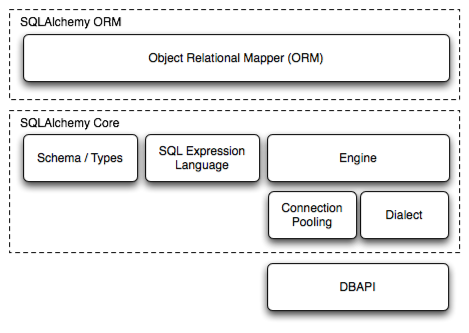
SQLAlchemy consists of several components, including the the ORM.
- Engine- manages the connection pool and the RDBMS-independent SQL dialect layer
- MetaData - used to collect and organize information about your table layout (schema)
- Session - establishes all conversations with the RDBMS and represents a "holding zone" for all the objects which you've loaded or associated with it during its lifespan
- SQL expression language - provides an API to execute your queries and updates against your tables, all from Python, and all in a database-independent way (low-level interface)
- ORM - provides a convenient way to add database persistence to your Python objects withoutrequiring you to design your objects around the database, or the database around the objects (high-level interface)
Example
SQLAlchemy gives us the choice between classical mapping and the newer declarative mapping
              import sqlalchemy
              sqlalchemy.__version__

              from sqlalchemy import create_engine

              # engine = create_engine("postgresql+psycopg2://user:zipassword@localhost/mydb" , echo=True)
              # The string form of the URL is dialect+driver://user:password@host/dbname[?key=value..],
              # where dialect is a database name such as mysql, oracle, postgresql, etc.,
              # and driver the name of a DBAPI, such as psycopg2, pyodbc, cx_oracle
              # The echo flag is a shortcut to setting up SQLAlchemy logging,
              # which is accomplished via Python’s standard logging module.
              # With it enabled, we’ll see all the generated SQL produced.
              # engine = create_engine("sqlite:///library.db", echo=True)
              engine = create_engine("sqlite:///:memory:", echo=True)

              metadata = MetaData()

              from sqlalchemy import Table, Column, Integer, String, MetaData, ForeignKey

              authors_table = Table(
                  "authors",
                  metadata,
                  Column("id", Integer, primary_key=True),
                  Column("name", String),
              )  # Column("name", String(50)) is possible

              books_table = Table(
                  "books",
                  metadata,
                  Column("id", Integer, primary_key=True),
                  Column("title", String),
                  Column("description", String),
                  Column("author_id", ForeignKey('authors.id')),
              )

              metadata.create_all(engine)  # creates the tables
Example (cont...)
Use of SQL expression language
              insert_stmt = authors_table.insert(bind=engine)
              type(insert_stmt)
              # Out: <class 'sqlalchemy.sql.expression.Insert'>
              print(insert_stmt)
              # Out: INSERT INTO authors (id, name) VALUES (:id,:name)

              compiled_stmt = insert_stmt.compile()
              print(compiled_stmt.params)
              # Out: {'id': None, 'name': None}

              insert_stmt.execute(name="Alexandre Dumas")  # insert a single entry
              insert_stmt.execute([{"name": 'Mr X'},{'name': 'Mr Y'}])  # a list of entries

              metadata.bind = engine  # no need to explicitly bind the engine from now on
              select_stmt = authors_table.select(authors_table.c.id==2)
              result = select_stmt.execute()
              result.fetchall()
              # Out: [(1, u'Mr X')]

              del_stmt = authors_table.delete()
              del_stmt.execute(whereclause=text("name='Mr Y'"))
              del_stmt.execute()  # delete all
Example (cont...)
Use of classical mapping
              from sqlalchemy.orm import mapper
              from sqlalchemy.orm import relationship, backref

              class Author:
                  def __init__(self, name):
                      self.name = name

                  def __str__(self):
                      return self.name


              class Book:
                  def __init__(self, title, description, author):
                      self.title = title
                      self.description = description
                      self.author = author

                  def __str__(self):
                      return self.title

              mapper(Book, books_table)
              mapper(Author, authors_table, properties = {"books": relation(Book, backref="author")})
Example (cont...)
Doing the same thing the easy way with declarative mapping
              from sqlalchemy.ext.declarative import declarative_base
              from sqlalchemy.orm import relationship, backref

              Base = declarative_base()

              class Author(Base):
                  __tablename__ = "authors"

                  id = Column(Integer, primary_key=True)
                  name = Column(String)

                  def __init__(self, name):
                      self.name = name

                  def __str__(self):
                      return self.name


              class Book(Base):
                  __tablename__ = "books"  # self.__table__ will be available for our objects

                  id = Column(Integer, primary_key=True)
                  title = Column(String)
                  description = Column(String)
                  author_id = Column(Integer, ForeignKey("authors.id"))
                  author = relationship(Author, backref=backref("books", order_by=title))

                  def __init__(self, title, description, author):
                      self.title = title
                      self.description = description
                      self.author = author

                  def __str__(self):
                      return self.title

              Base.metadata.create_all(engine)# create tables
Example (cont...)
Creating instances
              from sqlalchemy.orm import sessionmaker

              Session = sessionmaker(bind=engine)  # bound session
              session = Session()

              author_1 = Author("Richard Dawkins")
              author_2 = Author("Matt Ridley")

              book_1 = Book("The Red Queen", "A popular science book", author_2)
              book_2 = Book("The Selfish Gene", "A popular science book", author_1)
              book_3 = Book("The Blind Watchmaker", "The theory of evolutio", author_1)  # typo

              session.add(author_1)
              session.add(author_2)
              session.add(book_1)
              session.add(book_2)
              session.add(book_3)  # or simply session.add_all([author_1, author_2, book_1, book_2, book_3])

              # session.flush()
              session.commit()  # flushes (issues the statements and sends them to the RDBMS) and commits

              book_3.description = "The theory of evolution"  # update the object
              book_3 in session   # check whether the object is in the session
              # Out: True

              session.commit()
Example (cont...)
Queries
              session.query(Book).order_by(Book.id)  # returns a Query instance with a .statement attribute
              session.query(Book).order_by(Book.id).all()  # returns an object-list

              # return all book objects where title == "The Selfish Gene"
              session.query(Book).filter(Book.title == "The Selfish Gene").order_by(Book.id).all()

              # using LIKE
              session.query(Book).filter(Book.title.like("The%")).order_by(Book.id).all()

              query = session.query(Book).filter(Book.id == 9).order_by(Book.id)
              query.count()  # returns 0L
              query.all()  # returns an empty list
              query.first()  # returns None
              query.one()  # raises NoResultFound exception

              query = session.query(Book).filter(Book.id == 1).order_by(Book.id)
              book_1 = query.one()
              book_1.description  # returns "A popular science book"
              book_1.author.books  # returns a list of Book-objects representing all the books from the same author.

              # get a list of all Book-instances where the author"s name is "Richard Dawkins"
              session.query(Book).filter(Book.author_id == Author.id).filter(Author.name == "Richard Dawkins").all()
              session.query(Book).join(Author).filter(Author.name == "Richard Dawkins").all()
              session.query(Book).\
                  from_statement("SELECT b.* FROM books b, authors a WHERE b.author_id = a.id AND a.name=:name").\
                  params(name="Richard Dawkins").all()
... simply amazing!
Odin Data Access
https://gitlab.fifty.eu/odin/data-science/odin-data-access
Provides the odin_data_access module with some of the following entities:
- session module for creating Session objects in a Fifty environment via get_session and get_session_from_env
- DBBase - a tiny base-class that can be used as a mixin for mapping
- DBTableAccessor - tiny wrapper for Session and Table as well a "facade" for Query and pandas
The DBTableAccessor:
- represents a single RDBMS-table that is introspected during instance initialization (__init__)
- uses a mix of ORM and SQL expression language functionality
- contins a mapper for mapping custom classes to its corresponding Table
- used by Batman and Chuck Norris (source: incomplete Google search)
Demo
Now watch this well-rehearsed demo...